
Apple's new lineup is in Mockstand: iPhone 18 Pro, iPhone 18 Pro Max, and the first-generation foldable, iPhone Duo, are all in the frame library today, ready to drop your screenshots into. On top of the flat frames, iPhone 18 Pro Max and iPhone Duo also get fully 3D device mockups - real camera angles, real materials, and for Duo, a hinge you can fold to any angle you want.
Three new devices, one familiar workflow
All three phones show up exactly where you'd expect: open the Frame tab, search "iPhone 18" or "Duo," and drop one onto a slot. Each frame's screen area is calibrated per device, so your existing captures sit inside it correctly without any extra fiddling.
iPhone Duo gets two frame entries instead of one - iPhone Duo (Cover) and iPhone Duo (Open) - because a foldable genuinely has two different screens. Pick whichever matches the capture you're compositing: the cover-screen shot for the closed phone, or the inner-screen shot for the unfolded one.
3D iPhone 18 Pro Max: a studio shot in the editor
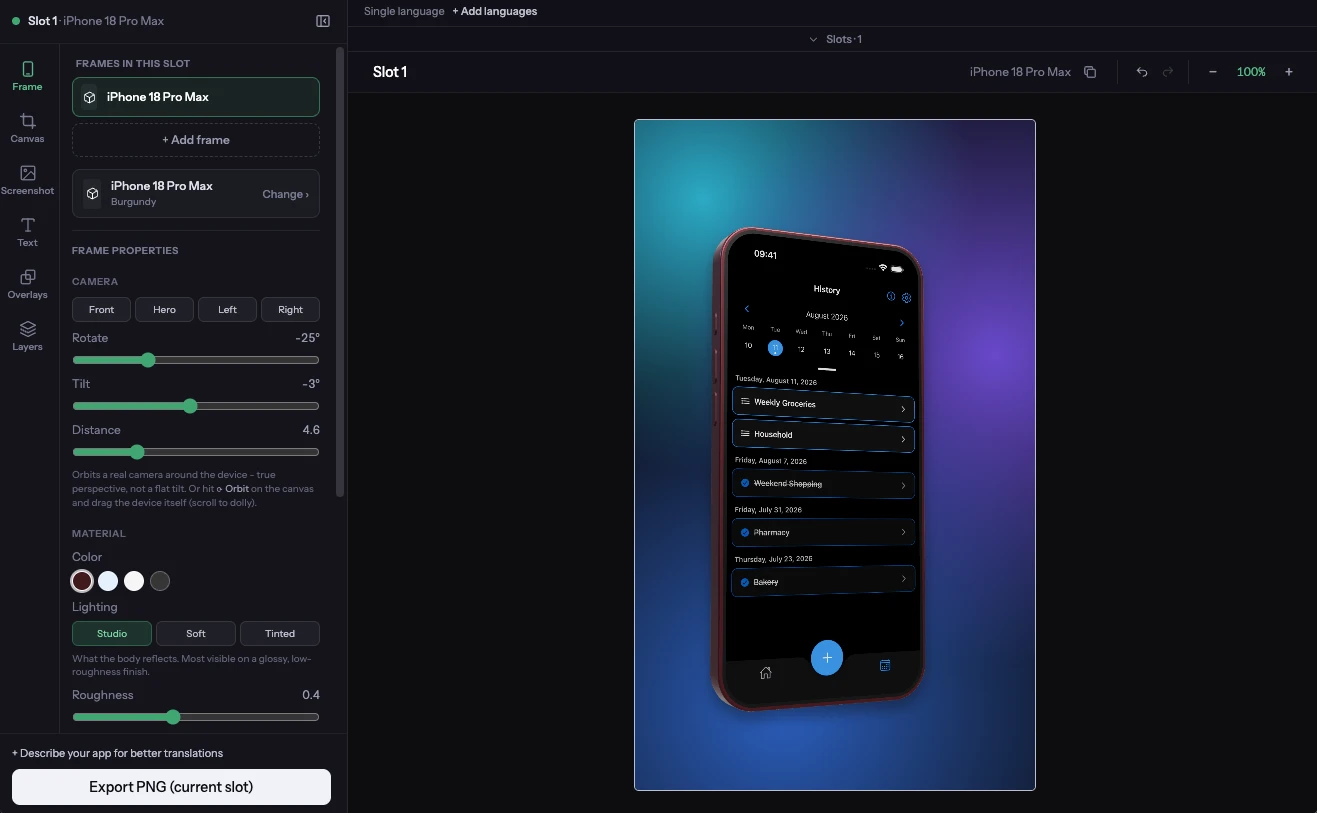
Like the other 3D devices in Mockstand, the iPhone 18 Pro Max is a parametric model rendered live in the editor - correct bezel, camera bump, and button placement - not a flat overlay PNG. Orbit the camera, pick a colorway, and adjust the screen brightness and lighting environment behind it, and the whole thing bakes down to a single image that drops into your slot just like a 2D frame would. It's the fastest way to get a premium hero shot for the first screenshot in your set without leaving the app.
If you haven't used the 3D pipeline before, our guide to picking between 2D and 3D frames covers where each one earns its place in a real screenshot set.
3D iPhone Duo: fold it to any angle
iPhone Duo is the first foldable in the 3D library, and it's also the first device where the fold itself is a control, not just a state. It comes as two 3D devices: iPhone Duo (Cover), the phone closed and showing its outer screen, and iPhone Duo (Open), the unfolded phone showing the inner screen. On the open version, a Fold slider sets the hinge angle anywhere from a 90° right angle up to perfectly flat at 180°, so you can show the phone part-way open instead of only fully flat.
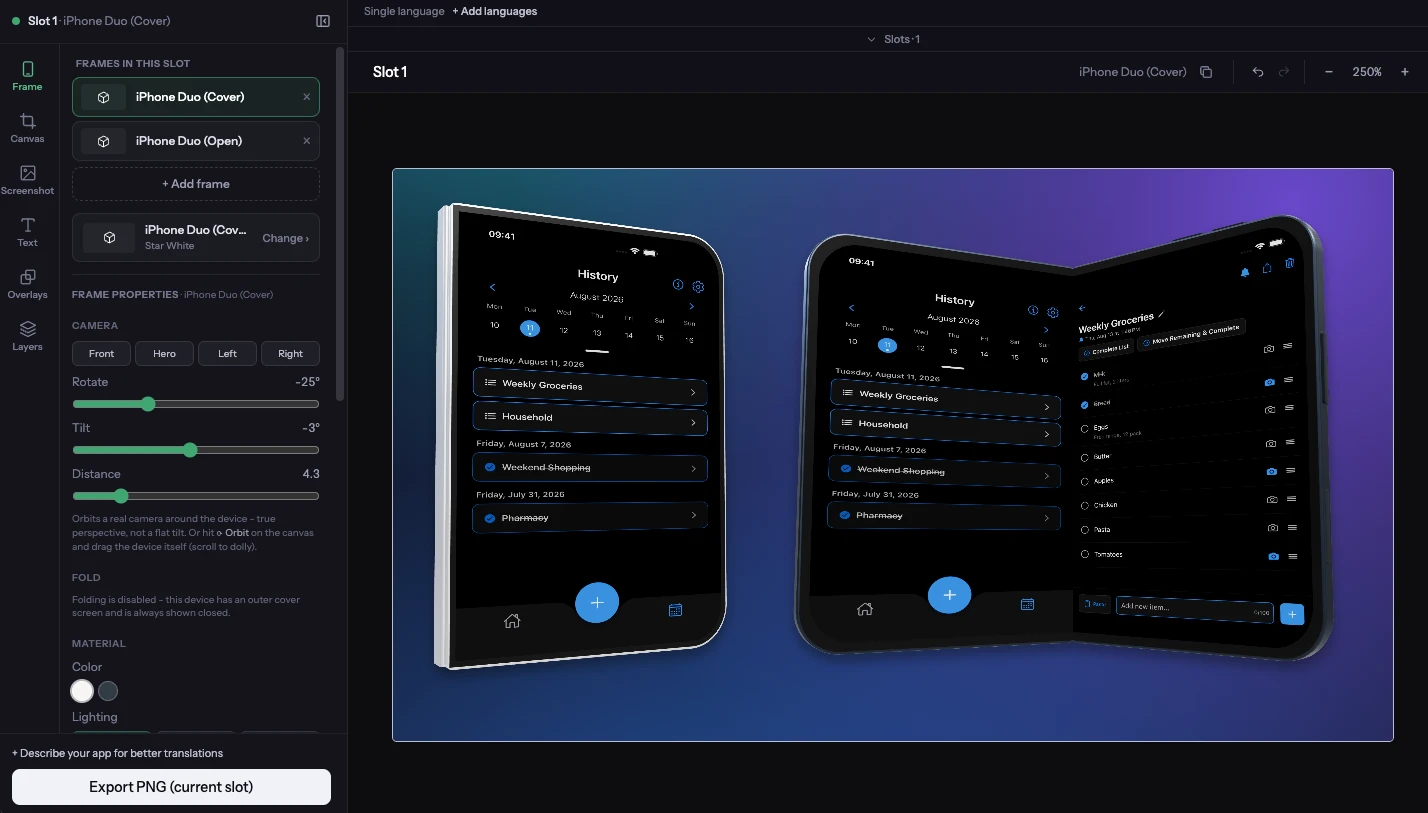
Each version takes a single screenshot for its own screen: a cover-screen capture on the Cover device, an inner-screen capture on the Open device. Want both states in one design? Add a second frame to the slot and switch it to the other version. Camera angle, colorway, and lighting work the same way they do on every other 3D device, and just like the Pro Max, the fold bakes down into one flat image on export.
Where to find them
3D devices are listed under their own "3D Devices" heading, above the flat frame library. iPhone 18 Pro is flat-frame only for now; iPhone 18 Pro Max and iPhone Duo (Cover and Open) appear in both the 3D section and the regular 2D library, so you can mix a 3D hero shot with flat frames for the rest of the strip, exactly like any other device.
Availability
The new 2D frames for iPhone 18 Pro, iPhone 18 Pro Max, and iPhone Duo are free for every registered account - no upgrade needed, just sign up and they're in your frame library. 3D frames, including the 3D iPhone 18 Pro Max, the 3D iPhone Duo, and its Fold control, are a paid-plan feature, available on Basic and Pro. If you're on the free tier, the flat frames work today; upgrading unlocks the 3D versions along with everything else paid plans include.
Frequently asked questions
Do I need a paid plan to use the new iPhone 18 frames?
Only for the 3D versions. The flat 2D frames for iPhone 18 Pro, iPhone 18 Pro Max, and iPhone Duo are available to any registered account for free. 3D mockups for Pro Max and Duo require a Basic or Pro plan.
Is there a 3D version of the iPhone 18 Pro (non-Max)?
Not yet - iPhone 18 Pro is currently available as a 2D flat frame only. The 3D pipeline launched with iPhone 18 Pro Max and iPhone Duo.
What's the difference between the cover and open iPhone Duo frames?
They represent the two physical states of the foldable: Cover is the phone closed, showing the outer screen, and Open is the phone unfolded, showing the larger inner screen. Each device takes a single screenshot for its own screen, so use a cover-screen capture with Cover and an inner-screen capture with Open. To show both in one design, add a second frame to the slot and switch it to the other version.
What does the fold-degree control actually do?
It sets the hinge angle on the 3D iPhone Duo (Open), from 90° up to perfectly flat at 180°. It isn't available on the Cover version, which is always shown closed, or on the flat 2D frames, which have no hinge.
Will these new frames slow down my export?
No. Like every 3D device in Mockstand, the Pro Max and Duo models bake down to a single flat image before they're composited, so a finished export is the same kind of file as any other frame - no extra weight in the PNG or ZIP.
Try them out
Open the Frame tab, search for iPhone 18 or Duo, and see how they look with your own screenshots dropped in.