
Every device frame does the same basic job: it wraps your raw screenshot in the chrome of a real phone or tablet so it reads as a product shot instead of a bare screen capture. But Mockstand actually gives you two different ways to do that - a classic flat frame, and a fully 3D device rendered from a real camera angle - and they are not interchangeable. Picking the wrong one for the job is a small mistake that quietly costs you polish on your listing or slows down a set you just need to ship, and most teams default to whichever one they used last time rather than actually weighing the two. Here is how the two differ, what each is actually good at, and a straightforward way to decide which belongs in your next screenshot set.
What a 2D device frame is
A 2D frame is a flat PNG of a phone or tablet with a transparent hole cut where the screen goes. Your screenshot drops into that hole, perfectly axis-aligned, and the frame sits on top like a sticker. It is the format almost every App Store and Google Play listing uses, and for good reason: it is fast, predictable, and reads instantly at thumbnail size in a search results strip.
Because the device is flat and front-on, every screenshot in the set lines up edge-to-edge. That consistency is exactly what you want across a strip of five or six screens - reviewers and shoppers scan them in under a second, and a flat, evenly-lit row of frames scans faster than anything with depth or perspective. If you have not settled on your target dimensions yet, our guide to screenshot sizes and specs has the exact numbers both stores expect.
What a 3D device frame is
A 3D frame is a different pipeline entirely. Instead of a flat overlay image, Mockstand builds an actual 3D model of the device - correct bezel, buttons, camera bump, body colorway - and renders it from a camera you can orbit and tilt, with real lighting and material response on the metal and glass. Your screenshot is composited onto the model's screen before the render, so the whole thing bakes down to one image that drops into the same layout pipeline as a flat frame. The output looks like a studio product photo rather than a cropped screen recording.
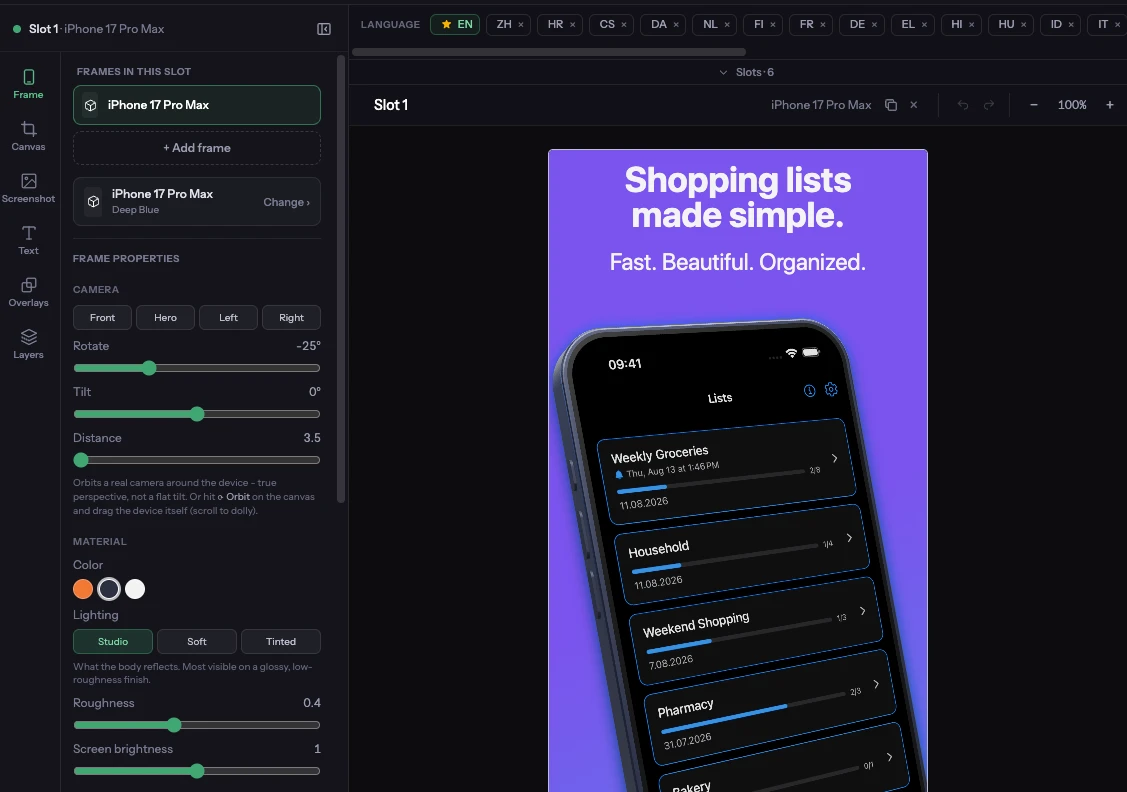
You get control over the camera angle, the device's colorway, screen brightness, and the environment lighting behind it, all live in the editor - so the same screenshot can sit dead-on for a store listing or tilted into a three-quarter hero shot without leaving Mockstand.
When a flat 2D frame is the right call
Your store listing grid
For the actual screenshot strip a shopper swipes through on the App Store or Play Store, flat frames are almost always the safer default. Consistency across the set matters more than any single frame looking impressive, and a flat frame keeps every screen the same size, same angle, same eye-line - which is what lets someone scan all five in a glance and understand your app's flow.
Text-heavy or UI-dense screens
A tilted 3D screen introduces perspective distortion at the edges. That is a fine trade for a hero image where the point is the vibe, not the pixels, but it works against you on a screen full of dense UI, tables, or small text you want legible in a thumbnail. Keep those axis-aligned in a 2D frame.
Large sets and fast iteration
If you are producing eight screens across twelve locales, flat frames are lighter to reason about and quicker to keep visually consistent at scale. Once you have the design nailed, our guide to localizing App Store screenshots covers building that set out across languages without redoing the layout each time.
When a 3D device frame earns its place
The first screenshot in the set
The first screenshot is doing almost all of the persuasive work - shoppers decide whether to keep scrolling based on it alone. A 3D hero shot with a tilted camera, real shadow falloff, and a colorway that matches your brand reads as considerably more premium than a flat frame in that single highest-leverage slot, even while the rest of the set stays flat behind it.
Marketing pages, social, and launch assets
Outside the strict App Store grid - your landing page, a Product Hunt launch, a tweet announcing the release - there is no consistency constraint forcing everything flat. This is where a 3D render's sense of depth and material genuinely pays off, and where competitors still shipping only flat PNG frames visibly can't match it.
Premium or design-forward products
Fintech, productivity, and design tools where trust and craft are part of the pitch benefit from the extra fidelity. A photorealistic device signals the same care you presumably put into the product itself.
Seasonal refreshes and promos
A holiday sale, a major feature launch, a version bump - these are moments where you want the listing to visibly look new without redesigning the whole set. Swapping just the hero screenshot's camera angle, colorway, or background is a fast way to make a listing feel refreshed, and it leaves the rest of your carefully-tuned flat set untouched.
The hybrid approach: mix both in one set
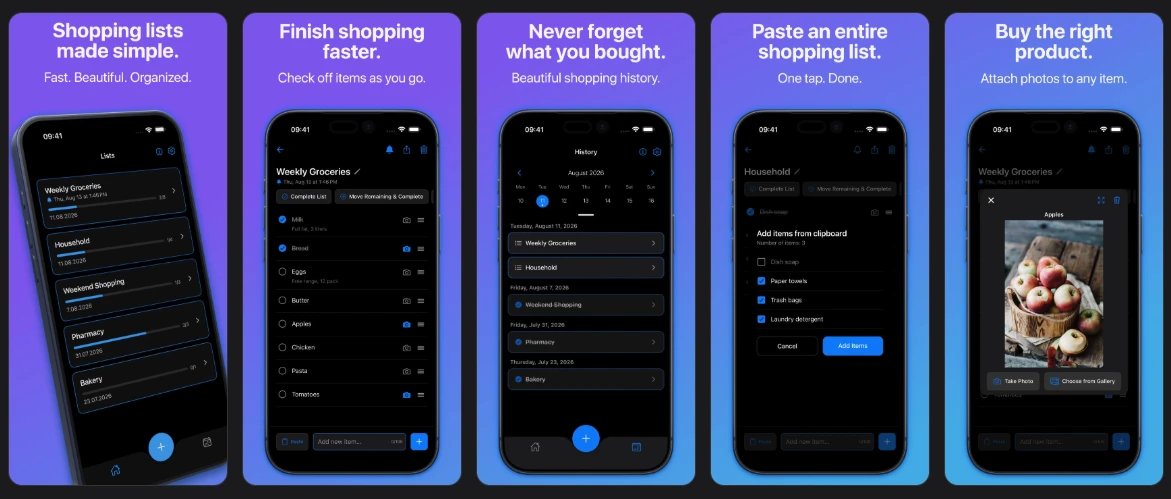
You don't have to choose one style for the whole listing. Because every device in Mockstand - 2D or 3D - is just a frame instance on a slot, the strongest sets often open with one 3D hero screenshot to catch the eye, then settle into flat 2D frames for the rest of the strip where scannability matters more than spectacle. It is the same trick print ads have used forever: one striking image up front, then clean, consistent supporting shots behind it.
A quick way to decide
If you only remember one rule: default to 2D for anything that needs to sit consistently inside a scrolling strip of screenshots, and reach for 3D wherever a single image needs to stop someone mid-scroll - the first screenshot, a hero banner, a social post. A short checklist if you're staring at a blank slot:
Reach for 2D when: the screen is text- or UI-dense, it's one of several screens that need to match exactly, you're producing many locales fast, or the content is landscape.
Reach for 3D when: it's the first screenshot in the set, it's a standalone marketing or social asset, the product's positioning leans premium, or you're refreshing a listing for a season or launch without touching the rest of the set.
Once your design is locked, check it against our App Store screenshot best practices guide before you export.
Frequently asked questions
Can I use a 3D device frame for every screenshot in my set?
You can, but it usually isn't the strongest choice. Perspective and shadow vary slightly frame to frame even with a locked camera angle, which reads as less uniform than a flat set once you have more than two or three screens in a row. Most sets look strongest with one 3D hero shot up front and flat frames behind it.
Do 3D device frames slow down export?
3D frames bake down to a single image before they're composited, the same as a flat PNG frame, so exporting a finished set is no slower once the render is cached. The render itself happens live as you adjust the camera or colorway in the editor, not during export.
Will Apple or Google reject a 3D device mockup?
No - both stores accept any screenshot that accurately represents your app's UI inside the frame. A 3D frame is still just an image of your real screen content; what gets rejected is misleading imagery, not the style of the device frame around it.
Can I match the 3D device's color to my brand?
Yes. Each 3D device ships with a set of colorway options, and you can adjust body color, screen brightness, and the surrounding lighting environment independently, so the render can sit closer to your brand palette than a stock flat frame usually allows.
Does using a 3D frame make my export files bigger?
Not meaningfully. The 3D device is rendered once and baked into a flat image before it's composited with your screenshot, so the final PNG or ZIP export is the same kind of file either way - there's no 3D data or extra weight carried into what you download.
Put it together
2D and 3D frames aren't competing options so much as two tools for two different jobs: flat frames win on consistency and speed across a full listing, 3D frames win wherever one image needs to carry the whole pitch. Use both, and use each where it's actually earning its place.