Features
Every tool you need
to ship App Store and Play Store screenshots.
A browser-based tool built for mobile developers who publish on both the App Store and Google Play. No design skills required.
Everything you need,
nothing you don't.
No watermarks. Export exactly what you see in the editor. No subscription required to try.
200+ device frames
iPhone, Android, tablet. Pixel-perfect frames with accurate screen-hole cutouts for every major model.
Multi-locale export
Add translations once. Export separate screenshot sets for every locale in a single ZIP, ready for App Store Connect.
AI caption translation
Translate your marketing copy into 40+ languages with one click. App Store tone, not generic machine output.
ZIP export
One ZIP with all locales sorted into folders. Drop it straight into App Store Connect or Fastlane - no renaming.
Saved projects
Pick up where you left off. Projects sync automatically - just sign in from any browser.
Spanning backgrounds
One gradient or image stitched across all slots as a panorama. The signature App Store look - two clicks.
Compose in the browser.
No installs, no plugins.
The editor runs entirely in your browser. Pick a device frame, upload your simulator screenshot, and it snaps inside the screen hole automatically. Adjust position, resize, apply a gradient background - everything is visual and instant.
- ✓ Drag-and-resize screenshot inside the screen hole
- ✓ Solid color, gradient, or full-bleed image backgrounds
- ✓ Text captions with custom fonts, colors, and sizes
- ✓ Overlay icons and decorative images above the frame
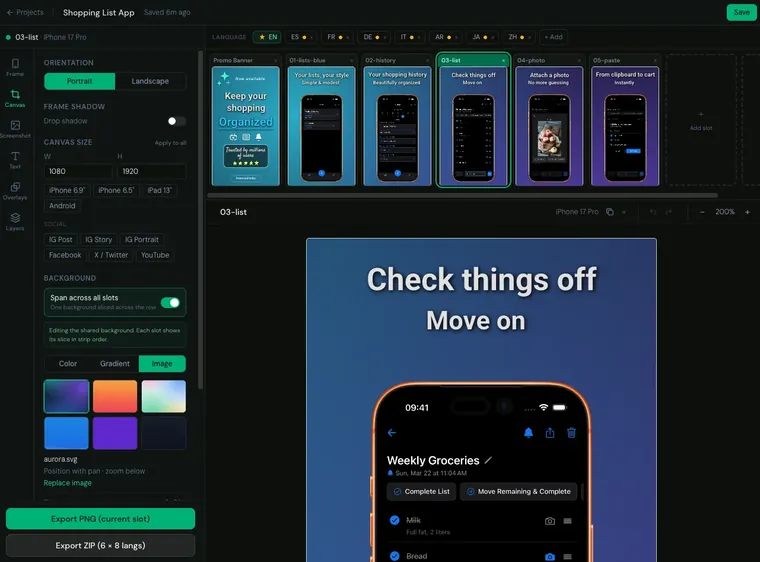
Ship to multiple locales
in one export.
Add languages to a project and Mockstand keeps each locale's screenshot and captions separate. The frame, background, and layout are shared - only the content changes. Export everything as a structured ZIP with one click.
- ✓ Per-language screenshots and caption text
- ✓ Auto-translate captions with AI (Basic & Pro)
- ✓ ZIP organized by locale - ready for App Store Connect
- ✓ Pre-flight check flags missing screenshots before export
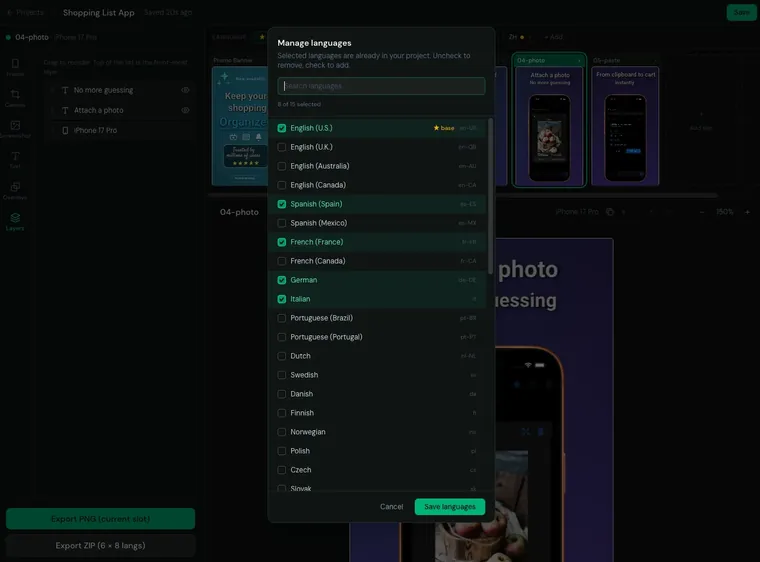
A background that spans
every screenshot.
Spanning background mode stretches a single gradient or image panorama across all your slots. Each screenshot gets a precisely sliced portion so the visuals flow from one to the next - the signature App Store look.
- ✓ Gradient or image panorama across all slots
- ✓ Layer reordering - overlays behind or in front of the frame
- ✓ Landscape orientation for iPad and tablet frames
- ✓ Undo/redo for every edit
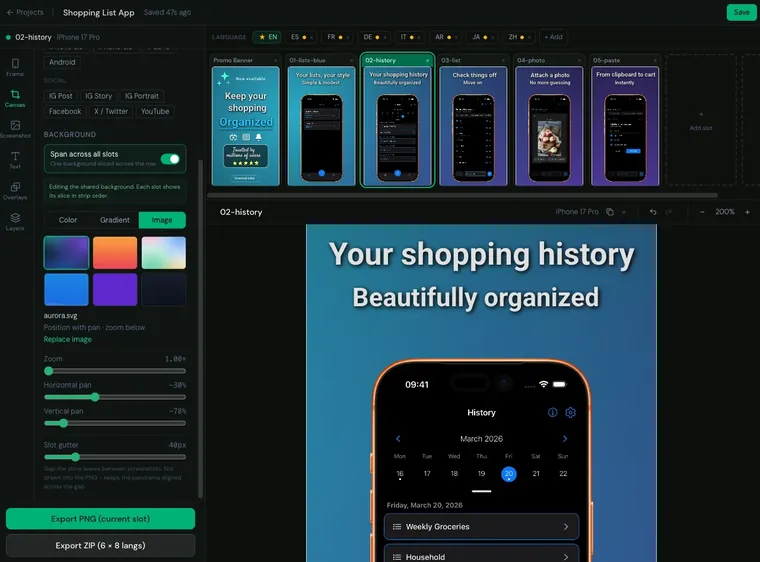
From upload to export
in under two minutes.
Pick a device frame
Choose from the built-in library - iPhone 16 Pro, Pixel 9, iPad, and more. Frames are pixel-perfect PNGs with a transparent screen hole.
Upload your screenshot
Drop any PNG or JPEG from your machine. The screenshot snaps inside the screen area automatically. Drag and resize to perfect the crop.
Export or ZIP
Download a single PNG at full store resolution, or bulk-export all your slots as a ZIP file - ready to upload to App Store Connect or Google Play.
Ready to try it?
No account needed. Open the editor and create your first screenshot in seconds.
Try for free