
Localized App Store screenshots are one of the highest-leverage ASO moves you can make: users are far more likely to install an app whose store listing speaks their language and shows their UI. But producing a screenshot set for 10 languages sounds like a production nightmare. It doesn't have to be. This guide walks through a workflow to localize your App Store and Google Play screenshots that scales from two languages to twenty without multiplying your work.
Why localized screenshots are worth the effort
Your screenshots are the single most visible asset on your store listing - most users decide whether to install after glancing at the first two or three, before they ever read a description. When those visuals are in the user's own language and show your app's interface localized, two things happen: comprehension goes up, and trust goes up. Both feed directly into conversion rate, and conversion rate feeds directly into how the store ranks you.
The mistake most teams make is localizing the text of their listing but leaving English screenshots in place. That's a half-measure. The screenshots are what people actually look at.
What actually changes per locale (and what doesn't)
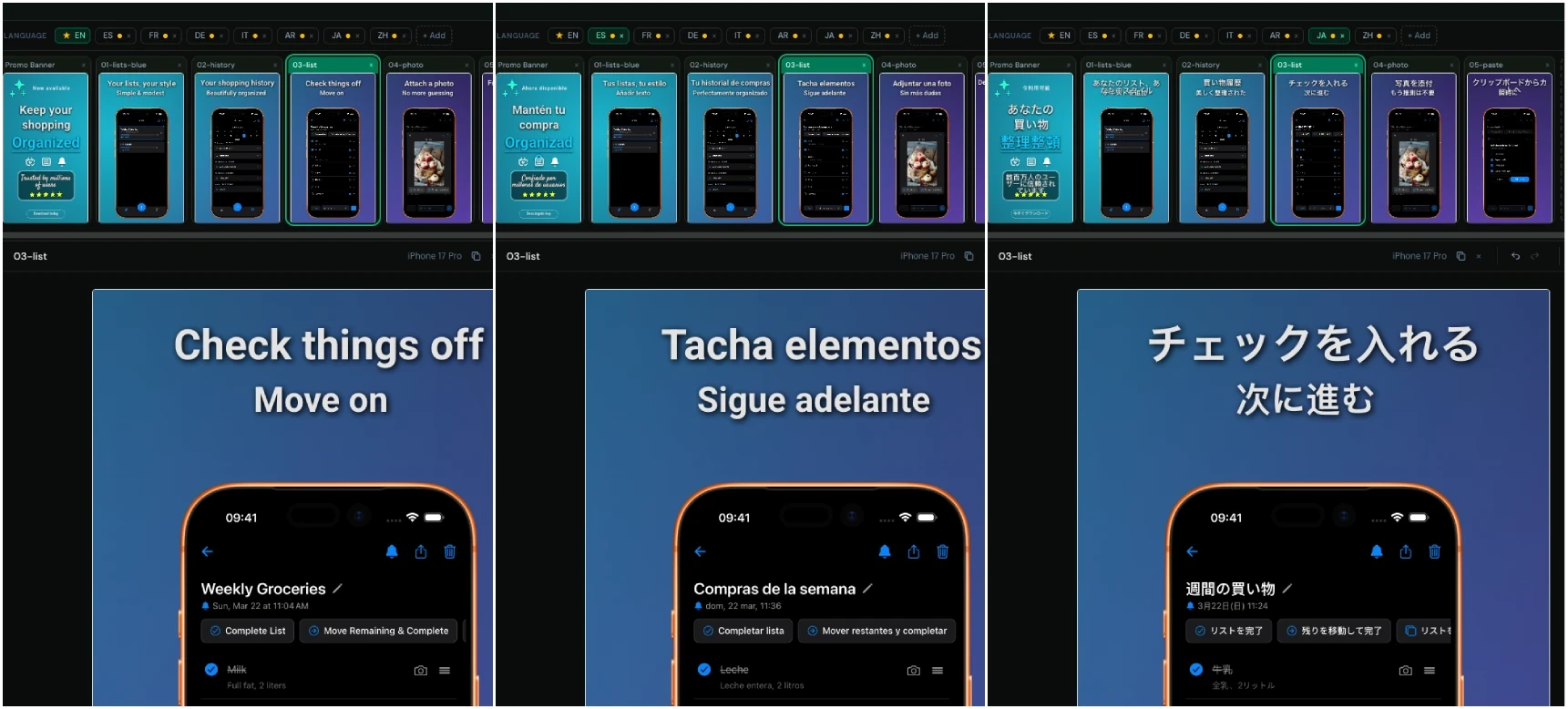
The key insight that makes localization manageable: very little actually changes between languages. In almost every set, only two elements differ:
- The app screenshot itself - the simulator capture, showing your UI in that language.
- The caption text - the marketing headline you overlay on each screen.
Everything else - the device frame, the background, the layout, the typography, the ordering of screens - stays identical. Once you internalize this, the whole job stops being "rebuild the set 10 times" and becomes "swap two things, 10 times." That's a completely different amount of work.
A workflow that scales
1. Lock a base set first
Design your primary language completely before you touch localization. Get the layout, colors, device frames, and captions exactly right. This base set becomes the source of truth - every other language is defined as a difference from it, so any design change you make later propagates everywhere for free.
2. Add languages as overrides, not copies
Don't duplicate the whole project per language. Instead, add each locale as a sparse layer that overrides only the fields that differ. This is exactly how Mockstand's multi-language model works: one base slot, and per-locale overrides for just the screenshot and caption. If a caption reads identically in German and Dutch, you write it once. Shared design stays shared.
3. Translate the captions - AI first, human where it counts
Draft every language at once with AI translation, then decide where you need a human pass:
- Western European languages (Spanish, French, German, Italian, Portuguese, Dutch) - AI output is usually ship-ready for short marketing captions. A quick native review is a bonus, not a requirement.
- Japanese, Korean, Chinese, Arabic - get a native reviewer. AI translations are grammatically correct but frequently miss the marketing register, and character-based scripts need a human eye on line breaks and length.
Mockstand includes AI caption translation that fills in every target locale in a single action, so the machine draft is done in seconds and your time goes entirely to review.
4. Capture localized simulator screenshots
Set your simulator or device to each target language and capture the same set of screens. Automate this with UI test snapshots if you can - a tool like Fastlane's snapshot can produce localized captures across languages and devices in one run. Then drop each locale's captures into the matching slot.
5. Export the full matrix at once
With base plus overrides in place, a single export generates every locale times every screen - the complete matrix - in one pass. Mockstand's ZIP export organizes the output so App Store Connect and Google Play Console accept the structure directly, with no manual renaming or folder-wrangling.
Common localization mistakes to avoid
- Leaving English UI in localized listings. If the caption is translated but the screenshot shows English, it reads as unfinished. Localize both.
- Letting captions overflow. German and Finnish run long; Japanese runs short. Check that each translated caption still fits your layout rather than assuming the English length holds.
- Forgetting right-to-left languages. Arabic and Hebrew need layout attention, not just translation.
- Rebuilding instead of overriding. The moment you copy a whole project to make a language variant, future edits stop propagating and the sets drift apart. Keep one base.
How many languages should you localize?
Start with the languages where you already have installs or traffic - your analytics will tell you. For most apps, covering English plus the top Western European languages and Japanese captures the majority of the opportunity. Because an override-based workflow makes each additional language cheap, you can expand into the long tail once the pipeline is set up, rather than deciding everything up front.
Frequently asked questions
Do I need separate screenshots for each language?
You need a separate app capture per language (showing your localized UI) and localized caption text, but you do not need to rebuild the surrounding design. Share the layout, frame, and background across all locales and override only what changes.
Can I use AI to translate App Store screenshot captions?
Yes, and for short marketing captions in common languages it works well. Use AI to draft all locales at once, then have a native speaker review higher-stakes markets. Mockstand has this built in, translating every target language in a single action.
What's the fastest way to export localized screenshots for the App Store?
Set up one base design with per-locale overrides, then batch-export a ZIP containing every language and screen at once. That single archive uploads straight to App Store Connect and Google Play Console without manual reorganizing.
Put it together
Localization stops being scary the moment you stop treating each language as a fresh project. One base set, sparse overrides, AI-drafted captions with human review where it matters, and a single batch export - that's a pipeline that holds up whether you ship two languages or twenty.